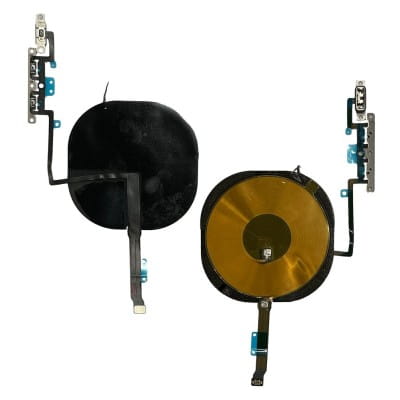
11PM NFC Flex
On the **iPhone 11 Pro Max**, the **NFC flex** (often called the Wireless Charging & NFC Coil Flex) is a multi-purpose internal assembly adhered to the inside of the rear glass housing. Rather than being a single standalone wire, Apple integrated several components onto this one ribbon cable.
### 1. Physical Architecture & Components
* **Qi Wireless Charging Coil:** The large circular copper winding centered on the back glass that receives inductive power from wireless chargers.
* **NFC Antenna Pad:** A thin, rectangular ferrite/copper antenna loop positioned near the top of the coil (just below the rear camera bump). This handles tap-to-pay (Apple Pay), transit cards, and NFC tag scanning.
* **Volume & Mute Switch Flex:** On the 11 Pro Max, the ribbon cable from the NFC/charging coil runs directly to the left-side volume up/down buttons and the ring/silent mute switch, sharing a single connector to the logic board.
* **Thermal & Grounding Pads:** Graphite and adhesive layers that dissipate heat generated during wireless charging and prevent signal interference.
### 2. Two Types of Replacement Parts
When sourcing or working with this part, it comes in two distinct versions:
* **Full Assembly (Pre-assembled):** Includes the wireless charging coil, NFC antenna, volume buttons, mute switch, and metal brackets pre-soldered together. Replacing it requires removing the screen, battery, and logic board, but requires **no soldering**.
* **Coil/NFC Pad Only:** Just the circular charging coil and NFC antenna without the volume flex attached. This is cheaper and avoids removing the logic board, but requires **micro-soldering** two tiny contact points onto the existing volume button ribbon cable inside the phone.
### 3. Common Failure Modes
* **Cracked Back Glass:** Shattered rear glass is the #1 killer of this flex. Sharp glass shards puncture the thin copper traces of the NFC antenna or charging coil, or heat from laser back-glass removal machines melts the adhesive and damages the ferrite shield.
* **Liquid or Tear Damage:** Because the ribbon snakes tightly around the battery and under the logic board, prying out the battery without proper solvent often slices the volume/NFC trace.
* **Symptoms of a Bad Flex:** Wireless charging stops working (or heats up without charging), Apple Pay fails to trigger at payment terminals, or the volume buttons/mute switch suddenly stop responding.
Related products
-
Iphone 11 Pro back camera 100% Genuine
₨ 3,100.00Add to cart# iPhone 11 Pro Back Camera 100% Genuine The **iPhone 11 Pro Back Camera 100% Genuine** is a replacement rear camera module designed for iPhone 11 Pro. It is suitable for professional mobile repair shops and technicians replacing a damaged or faulty rear camera. ### Key Features * 100% Genuine replacement camera as specified * …
-
Iphone 11 back Camera 100% Genuine
₨ 1,400.00Add to cart# iPhone 11 Back Camera 100% Genuine The **iPhone 11 Back Camera 100% Genuine** is a genuine replacement rear camera module designed specifically for the iPhone 11. It is suitable for replacing a damaged, faulty, or non-functioning rear camera during professional repair. ### Key Features * 100% Genuine camera module as specified * Designed specifically …
-
Iphone 13 Mini Back camera 100% Genuine
₨ 2,100.00Add to cart# iPhone 13 Mini Back Camera 100% Genuine The **iPhone 13 Mini Back Camera 100% Genuine** is a genuine replacement rear camera module designed specifically for the iPhone 13 Mini. It is suitable for replacing a damaged or faulty rear camera during professional mobile phone repair. ### Key Features * 100% Genuine camera module as …


On Sale
-
 YCS D03 Bootcable
Original price was: ₨ 2,500.00.₨ 2,200.00Current price is: ₨ 2,200.00.
-
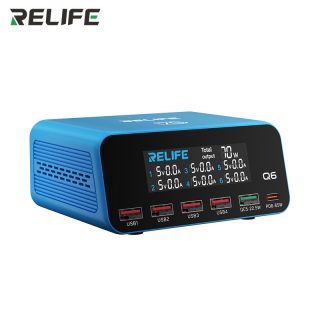 RELIFE Q6 Smart Multi-Port Charger
Original price was: ₨ 2,800.00.₨ 2,600.00Current price is: ₨ 2,600.00.
-
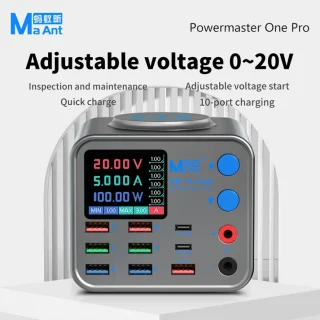 Dianba No.1 Professional Edition
Original price was: ₨ 8,500.00.₨ 8,200.00Current price is: ₨ 8,200.00.
-
 MAANT multi port multi-function charger Dianba No.2
Original price was: ₨ 6,300.00.₨ 6,050.00Current price is: ₨ 6,050.00.
-
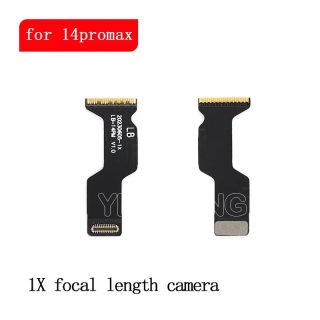 LB Rear Camera Cable 14PM
Original price was: ₨ 1,500.00.₨ 1,400.00Current price is: ₨ 1,400.00.